


Solitaire Deluxe® 2: Card Game
4.311.16K Reviews
App Specs
- Version
- 4.88.0
- Updated On
- License
- Free
- Downloads
- 5,000,000+
- Developer
- Murka Games Limited
- Categories
- Card
- Platform
- Android, iOS
Screenshots
 Analysis by AppCompare
I usually turn to solitaire when I want a quiet game that is easy to pick up and put down, and Solitaire Deluxe® 2: Card Game is built around that kind of flexible play. It brings several familiar card-game formats together, so I can move from a quick Klondike hand to a more deliberate Spider or FreeCell game without switching apps. That variety is its strongest practical advantage, though it also means the experience is best for people who enjoy trying different solitaire rules rather than mastering just one version.
The Game Experience
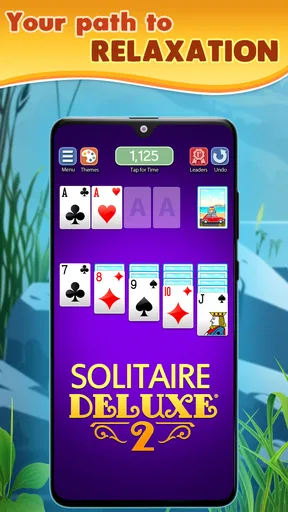
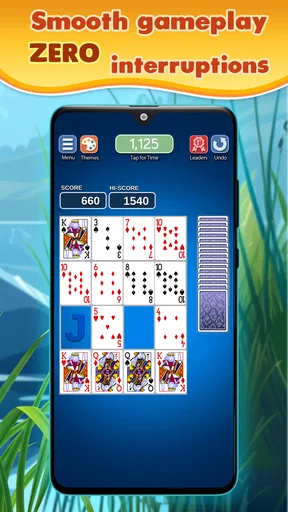
Right off the bat, Solitaire Deluxe® 2 impresses with its sleek and modern design. The user interface is clean and intuitive, making it easy for both newbies and seasoned players to navigate. I was able to jump into a game without any fuss, which is always a plus when you’re itching to start playing.
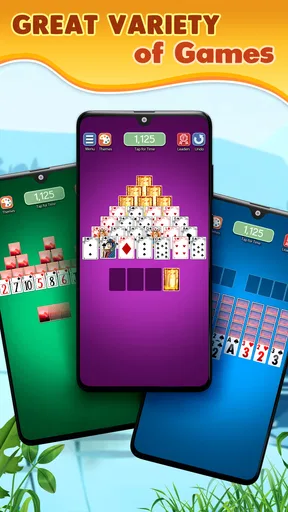
The app offers a variety of solitaire games, not just the classic one we all know and love. From Klondike and Spider to Pyramid and FreeCell, there’s something here to keep you entertained for hours. Personally, I’ve been hooked on Spider Solitaire lately, and this app delivers a seamless experience with smooth animations and responsive controls.
The range matters most when I want to match a game to the time and attention I have. A familiar Klondike hand is an easy choice for a short break; Spider asks me to think through longer sequences, while FreeCell rewards careful planning. Having those options close together makes this more useful than a single-game solitaire app, especially if I get bored repeating the same deal style.
For a realistic everyday use, I can open a quick hand while waiting for an appointment, then leave the phone aside when my turn comes. Solitaire works well in these small gaps because I can focus on the cards rather than follow a story or coordinate with other players. The trade-off is that a longer Spider session is less suited to an interruption: if I’m likely to be called away, I choose a simpler game or wait until I have a clearer stretch of time.
Choosing a Game for the Moment
One useful way to approach the collection is to treat its variations as different levels of mental involvement, not simply as a checklist. When I want something familiar, Klondike is the comfortable starting point. When I want to slow down and weigh card sequences, Spider or FreeCell can make a short break feel more absorbing. Pyramid provides another change of pace, so the app can serve both as a low-effort distraction and as a more considered puzzle.
That breadth is also a small limitation. A player who only wants one specific solitaire ruleset may find a dedicated version more direct, with fewer menus and less to explore. This app makes more sense if variety is part of the appeal. If I were recommending it to a friend who already knows exactly which format they play every day, I’d suggest comparing it with a focused alternative before deciding.
Worth Reading Before You Choose

Flipboard Shows What News Apps Must Do Beyond the Feed

Switching to Android Auto Means Rethinking Your Driving Routine

Google Calendar Makes a Crowded Week Easier to Manage

Ludo King Makes the Most of the Minutes Between Plans

Baby Panda World Brings Quick Play to Modern Phones, but Its Game Library Feels Busy

ESPN’s Live Game View Makes Following Close Games Easier
Features and Customization
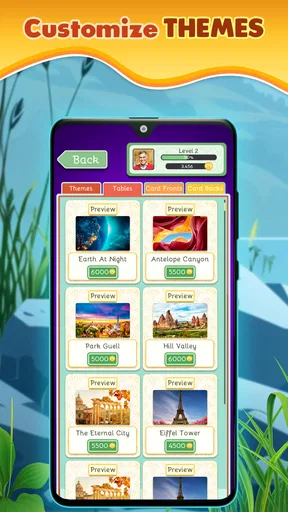
One of the standout features of Solitaire Deluxe® 2 is the level of customization available. You can choose from a variety of card designs and backgrounds to suit your mood or style. I love switching things up with different themes; it keeps the game feeling fresh and personalized.
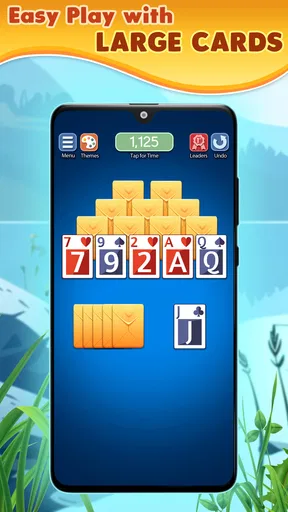
For longer sessions, changing the card design can be more than decoration: a clear, comfortable deck helps me scan the layout without tiring as quickly. I’d prioritize legibility over novelty if I were playing on a smaller screen or in a bright room. A background that looks attractive is not necessarily the easiest one to read against, so it is worth trying a couple of combinations before settling on a favorite.
Another cool feature is the daily challenges. These add a fun twist to your usual gameplay and give you a reason to check in each day. Completing challenges earns you points and rewards, which adds a nice layer of motivation to keep playing. I’ve found myself eagerly logging in daily just to see what new challenges await.
I’d treat a daily challenge as an optional prompt rather than a chore. It can be a useful way to try a mode I might otherwise overlook, but the app is just as suitable for a casual hand when I do not want another daily task to maintain. If I’m trying to keep my phone breaks brief, I can enjoy the basic variety without turning the challenge routine into an obligation.
The app also includes a helpful hint system. If you’re ever stuck, just tap the hint button, and you’ll get a nudge in the right direction. This is particularly useful for beginners or when you’re trying out a new solitaire variation.
My practical tip is to use hints as a learning aid, not as the first move in every uncertain position. I prefer to scan the tableau once, check for obvious moves, and then ask for help if I still cannot see a path. That keeps the puzzle element intact while making the hint useful for understanding a new variation. Players who want every decision to be entirely self-directed may prefer to ignore it; players learning the rules can use it to avoid getting stuck for too long.
Social and Competitive Elements
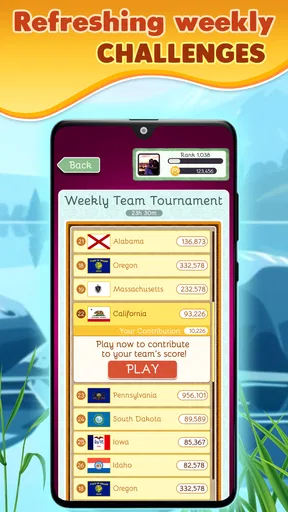
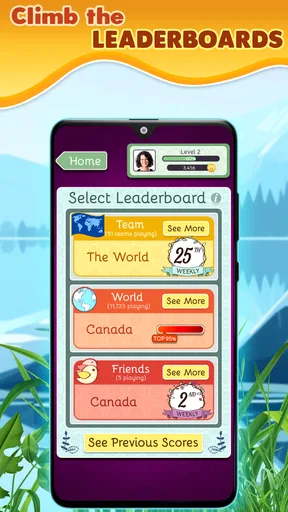
For those who enjoy a bit of competition, the app offers a leaderboard feature. You can compete against players worldwide and see how your scores stack up. It’s a great way to challenge yourself and aim for that top spot. I’ve had a few close calls but haven’t quite reached the top yet. Maybe you’ll have better luck!
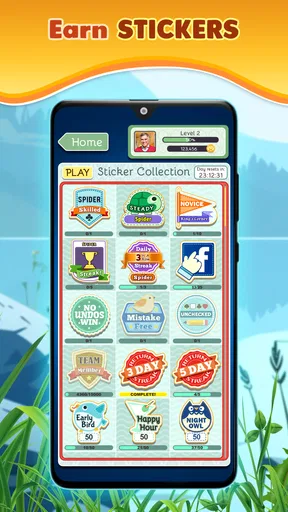
There’s also a social aspect to the game. You can connect with friends and share your achievements. It’s a fun way to stay connected and maybe even spark some friendly competition. Plus, who doesn’t love bragging rights?
I see these features as extras, not the reason to install the game. Solitaire is naturally easy to play at my own pace, and the leaderboard gives competitive players another goal without requiring a live match. If I want direct interaction, conversation, or a game decided by another person’s moves, a multiplayer card game would suit me better. Here, the social layer is most appealing when I simply want to compare progress or share a small achievement.
Performance and Accessibility
The app performs smoothly on both Android and iOS devices. I haven’t experienced any crashes or lag, which is crucial for maintaining a good gaming experience. The developers have clearly put effort into optimizing the app for various devices, ensuring that everyone can enjoy a seamless experience.
In speed terms, solitaire is a light kind of activity: there is no need to wait for a match or a complicated sequence to load before making a move. In my experience, the responsive controls help the game feel immediate, and the short-turn format makes it easy to fit into spare moments. I would not mistake that for a guarantee that every phone or connection will behave identically, but the basic play style does not demand the same sustained processing or attention as a visually intensive action game.
For heavier use, the main strain is more likely to be on my attention than on the device. Moving between several variations, customizing the table, checking a challenge, and then playing multiple hands can turn a supposedly brief break into a longer session. I find it helps to choose the mode before starting and to stop after a hand if I only have a minute. That small habit prevents the abundance of options from making a quick visit longer than intended.
For those concerned about accessibility, the app offers options to adjust the text size and enable or disable sound effects. This makes it more inclusive and accessible for players with different needs and preferences.
Those settings are useful for adapting the experience to the situation: I can keep sound off in a waiting room and make text more comfortable to read when needed. Device size still matters, since a card layout is naturally easier to inspect when the screen gives the cards room. The minimum operating-system requirement is Android 6.0, so anyone using an older Android version should check compatibility before planning to install it. The game is free to download, rated for Everyone, and developed by Murka Games Limited.
Reliability and Everyday Fit
Reliability matters in a game I open for just a few minutes. My experience has been smooth, with no crashes or lag, and the straightforward format makes it easy to get back to playing after a pause. I still avoid making assumptions about recovery in every circumstance: if a phone closes an app or runs low on power, I would not count on a particular hand being preserved unless I had seen that behavior on my own device.
That is why I treat it as a convenient spare-time game rather than a place to invest in one long, uninterrupted session. It fits a commute as a passenger, a quiet lunch break, or a few minutes at home while something else is cooking. I would not play while walking or when I need to stay alert to a conversation; the simple controls do not make attention-free play a good idea.
Against the usual alternatives, this collection sits between a bare-bones single-game solitaire app and a broader casual-game hub. A single-mode app can be quicker if all I want is one familiar layout, while a general game collection may offer more kinds of entertainment but less depth in any one card format. Here, the appeal is having several recognizable solitaire choices in one place, along with customization and optional goals. The compromise is that players seeking a minimalist, distraction-free deck may prefer an app with fewer extra layers.
Monetization and Ads
Now, let’s talk about the monetization aspect. The app is free to download and play, but like many free apps, it includes ads. They’re not overly intrusive, but they do pop up occasionally between games. If ads aren’t your thing, there’s an option to upgrade to an ad-free version via in-app purchases.
I decided to stick with the free version for now, and honestly, the ads haven’t bothered me much. It’s nice knowing there’s an option to remove them if they ever become too distracting.
There are also in-app purchases, with prices ranging from $0.99 to $49.99 per item. I would start with the free experience and decide based on how often I play and whether the ads interrupt my routine enough to justify spending. Those purchases are optional; they do not change the basic reason to try the game, which is the selection of solitaire formats. Anyone who prefers a completely uninterrupted experience from the outset should factor that trade-off into the choice.
Who Should Pick It Up
I’d recommend this to someone who likes solitaire but does not want to install a separate app for every variation. It is particularly suitable for casual players who appreciate a familiar game they can start quickly, and for curious players who want to move from Klondike into Spider, FreeCell, or Pyramid without a steep learning curve. The customization and hints also make it approachable when I am still getting comfortable with a particular format.
I would steer a different player elsewhere if they want a strict tournament experience, a live opponent, or a single highly focused version with no extra prompts. The leaderboard adds a competitive target, but it does not turn solitaire into a face-to-face contest. Likewise, someone who dislikes ads in free games may prefer a paid alternative, while someone who only plays one mode may value simplicity more than a larger collection.
The game has been available since March 3, 2015, and its current version is 4.84.0. It has a 4.4 average from around 44,000 ratings, with over five million installs. Those figures suggest a well-established choice, but they are not a substitute for personal fit: I’d still judge it by whether its pace, range of modes, and ad-supported free play suit the way I use my phone.
Final Thoughts
Overall, Solitaire Deluxe® 2: Card Game is a fantastic app for anyone who enjoys card games. Its variety of games, customization options, and engaging features make it stand out in the crowded world of mobile solitaire apps. Whether you’re a casual player or a solitaire aficionado, this app has something to offer.
So, if you’re ready to deal yourself in, head over to your app store and give it a try. Who knows? You might just find yourself hooked like I did!
Pros
- Beautiful and intuitive user interface
- Wide variety of solitaire games included
- Daily challenges to keep gameplay fresh
- Offline play available without interruptions
- Smooth performance with minimal lag
Cons
- Contains in-app purchases and ads
- Limited customization options for themes
- Occasional crashes on older devices
- Some games require internet for leaderboard
- Frequent updates can be data-intensive
FAQs for Solitaire Deluxe® 2: Card Game
What features does Solitaire Deluxe® 2 offer?
Solitaire Deluxe® 2 offers over 20 different versions of solitaire, including classics like Klondike and Spider. The app features daily challenges, customizable themes, and a tutorial for beginners. It also includes an ad-free experience and daily rewards, making it ideal for both casual players and solitaire enthusiasts.
Is Solitaire Deluxe® 2 free to play?
Yes, Solitaire Deluxe® 2 is free to download and play. However, it does offer in-app purchases for additional features, such as removing ads and accessing exclusive themes. Players can enjoy the core gameplay without spending money, but premium options enhance the experience.
Can Solitaire Deluxe® 2 be played offline?
Yes, Solitaire Deluxe® 2 can be played offline, allowing users to enjoy their favorite solitaire games without an internet connection. This makes it perfect for playing during travel or in areas with limited connectivity. However, certain features like daily challenges may require internet access.
How does Solitaire Deluxe® 2 handle ads?
Solitaire Deluxe® 2 includes ads to support the free version of the app. While ads may appear between games, players can opt for an ad-free experience through a one-time purchase. This option enhances gameplay by removing interruptions, providing a smoother user experience.
Is Solitaire Deluxe® 2 suitable for beginners?
Absolutely! Solitaire Deluxe® 2 is designed for players of all skill levels. It includes a comprehensive tutorial to help beginners learn the rules and strategies of various solitaire games. The app's user-friendly interface and adjustable difficulty settings make it accessible and enjoyable for newcomers.


